Platform updates: Parents join the club, member management and more
Our biggest update since launch. Parents and guardians get their own place in the club, managing a roster takes far fewer taps, and a new event invites the right people on its own.
On your phone, close Spike fully and open it again. That downloads the update. Everything below arrives with it.
Parents and guardians are part of the club
A parent now has access to everything their child belongs to: teams, groups, events and clubs. They no longer need to join as a player to see any of it.
In those chats they reply as themselves, marked as the child’s parent.
Coaches can see who is behind each child
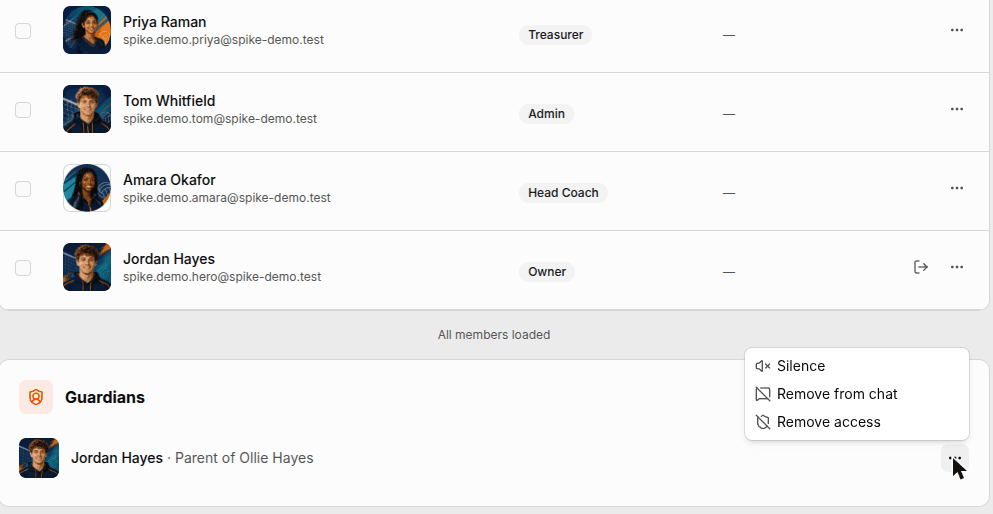
The people list of a club, team or group now shows parents and guardians next to the members. A coach can see straight away which adult belongs to which child, and who to contact.
A club can also limit a parent, per club, team or group: silence them in a chat, keep them out of a chat, or remove their access. None of the three touches the child’s place. The decision shows in the people list with its reason, and can be lifted at any time.
Set up your household
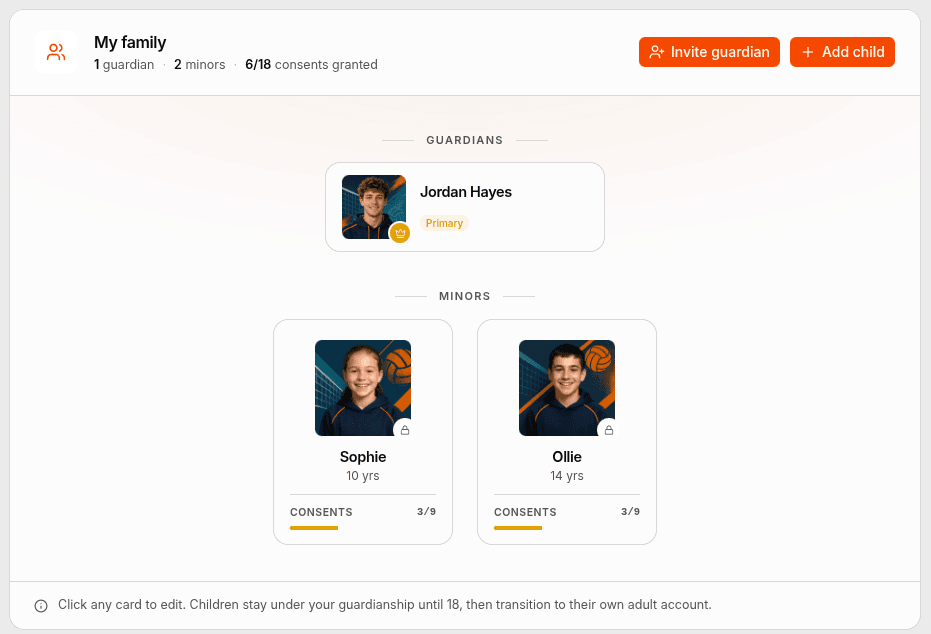
You can invite a co-guardian, such as a second parent, a grandparent or a carer, to help manage your children’s activities. You choose which children they can see.
Teenagers can start this themselves. A 13 to 17 year old can name a parent by email while setting up their profile, or later under Settings › Family. That person signs up as normal and finds the request waiting in their own app. Until they answer, the invitation sits on the teen’s family screen, and the teen can withdraw it.
Manage a roster without repeating yourself
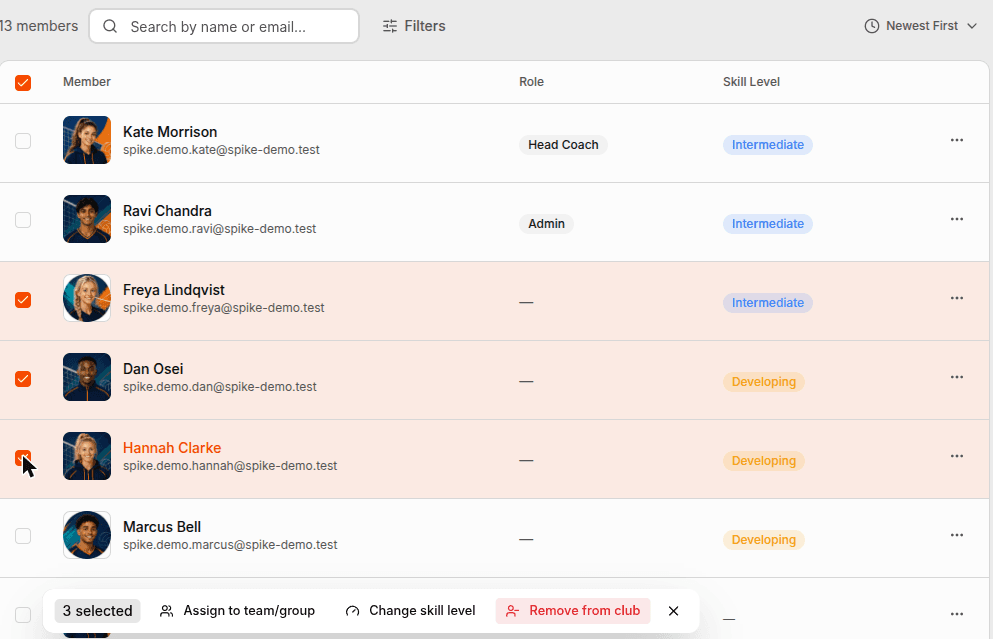
In any club, team or group list, admins and managers can pick several people and act on all of them at once: assign them to a team or group, set their skill level, or remove them. Each row also has one menu with everything you can do to that person.
On the phone, a long press starts the selection.
New events invite the right people
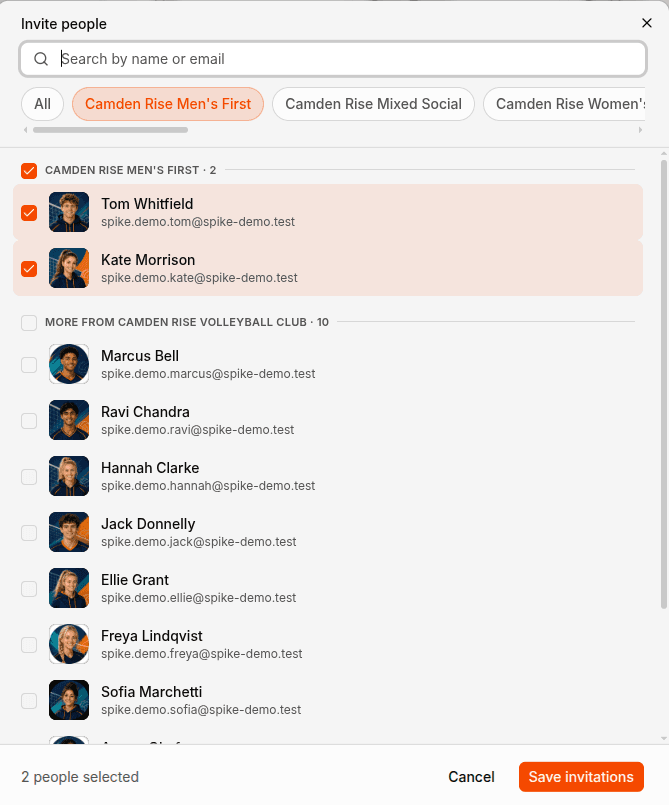
Start an event from a team, group or club and the people are already in place. Its coaches come in as hosts, each with their role, and its members come in as invited. Untick anyone who should not be there.
Players, staff and parents are selected separately, and parents stay off unless you turn them on. You can also build the event’s teams inside the wizard, with names and colours. They exist as soon as the event does, and anyone you drop into a slot is invited automatically.
Reach the right people, and see who read it
Staff can write @guardians in a post or a chat to reach every parent behind a club, team or group. Tap any group mention, such as @guardians, @everyone or a position, to see exactly who it covers.
Authors, coaches and admins can see how many people a post reached, and open the count to see the names. An event’s member list shows who has opened it, and flags anyone who last looked before you changed the time or the place.
Strangers have to ask first
Messaging is stricter now. Only members of the same club can message each other directly. To reach someone in another club, you send a message request first: one message, with no attachments or links, until they reply. They can accept it, decline it, or block and report, each with one click. For now, requests are answered on the web.
Also in this release
- Editing a post brings back everything you wrote it with: attachments, mentions, emoji, video links and pinning. You can swap attachments without starting the post again.
- The coaching tools are redesigned. Your own drills, training plans, exercises and evaluations sit on the home screen. Everyone else’s are under Discover.
- Apple Pay and Google Pay are on the phone’s payment sheet.
- Team rosters get a lineup board: six seats, each with its own depth chart, and a serving and receiving switch that brings the libero on.
- The form builder is fullscreen, and it now says why a form cannot be saved.
- Polls let you change your mind: switch your vote, or take it back.
- On the web, a deleted message can be undone while a countdown runs.
- Alerts can be filtered by posts, teams, registrations, family and coaching, and show a photo of who they are about.
- Events lists open on what is coming up, not on everything that ever happened.
- On the phone, a member can hold several roles at once.
- Clubs are listed publicly once they are verified.
Fixed
- Parents did not get push notifications for their child’s chats. Every one was dropped before delivery.
- Adding several people to a team added only the first. The list now says who was skipped and why.
- A parent could read a post in their child’s group but not reply, and a removed player stayed in the team chat.
- A club member outside a private group could read its posts in the feed.
- Events created from the planner could not be joined, because they had no registration window. The planner also squeezed seven days into whatever width was left.
- A fee paid by a parent was recorded as paid by the child, in the app and in Stripe.
- Filtering plans by skill did nothing, and four of the five sort options quietly returned newest first.
- Accepting a second family invitation could split a parent across two families. It is one household per person now.
- Signing in to a second account in the same browser sent the first one back to profile setup.
- Suspended accounts still appeared in profile search.
- Some dates showed the month before the day.
- Email verification links worked more than once. They are now single-use and expire after 24 hours.
- A drill with a variation crashed its page, and so did a drill with no skills.
- The “Added you to a team” alert said “Admin” instead of naming who did it.