A volleyball drills library, and the sessions you build from it
Drills with instructions, coaching points and animated court diagrams, sequenced into a session plan that fits your hall time, attached to a training event, and run from your phone on the night. Free forever, on the web and in the app.
Build a session planMost club sessions are planned in the car park
At amateur level the coach is usually a player who volunteered, planning around a job. The session gets decided on the drive over, which means the same three drills on rotation, warm-ups that overrun, and no record of what the squad has actually worked on this season.
None of that is a knowledge problem. It is that a session plan lives in a notebook or a coach’s head, so it cannot be reused, cannot be handed to anyone else, and disappears the moment that coach stops turning up.
One library: yours, your club’s, and everything you saved
Drills you wrote, drills your clubs wrote, drills you saved or liked from other coaches, and the public library — one list, grouped by where each one came from, rather than four places to look. A general sports app gives you a notes field; this is volleyball-shaped, so “fifteen minutes of blocking work for eight players” is a filter rather than a memory test.
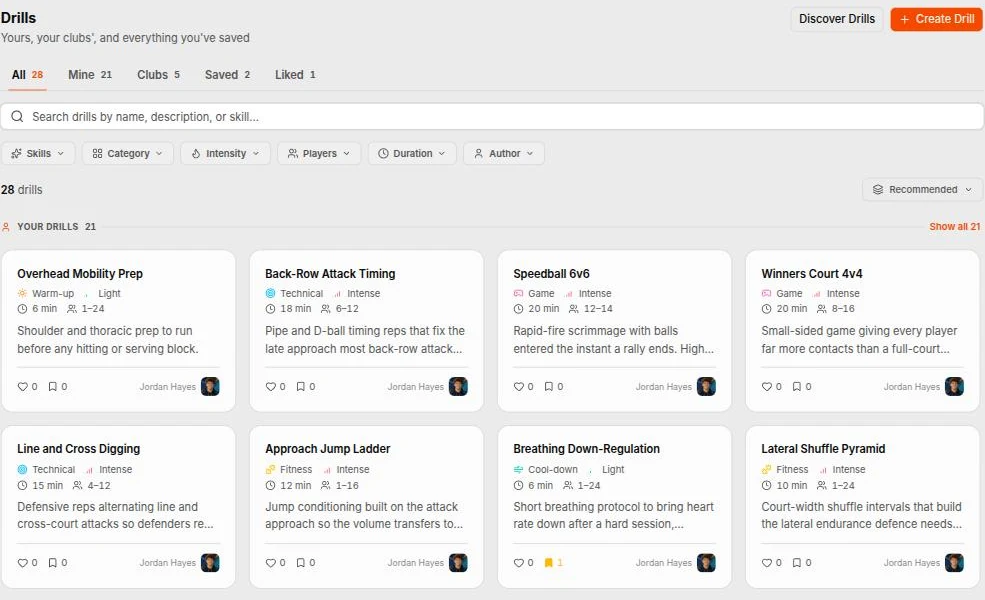
- Phase — Warm-up, technical, tactical, game, conditioning, cool-down
- Skill — Serving, passing, setting, attacking, blocking, defence, footwork, conditioning
- Intensity — Low, medium or high — so a warm-up does not open with a max-effort drill
- Numbers, time and kit — Minimum and maximum players, how long it runs, and the equipment it actually needs
A drill is more than a name and a duration
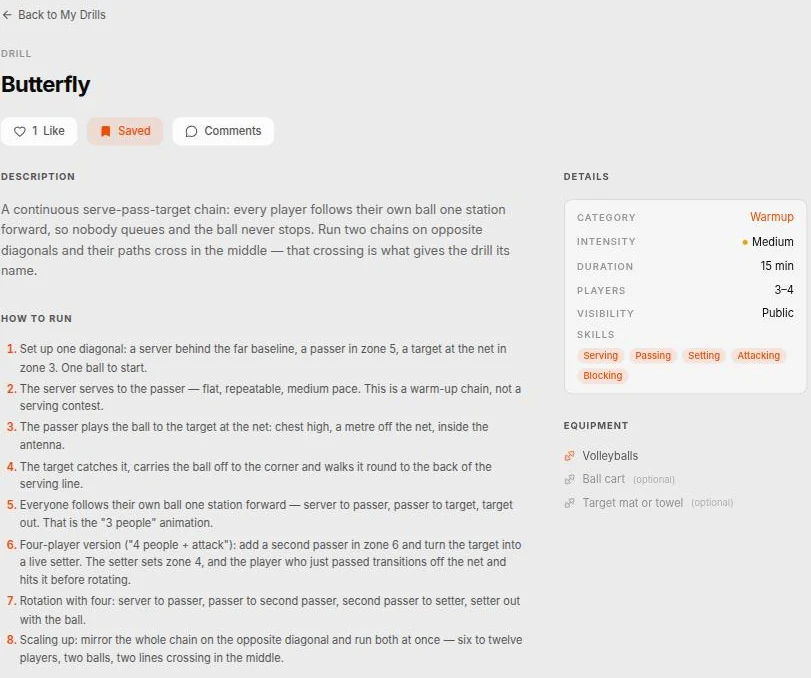
Instructions and coaching points as proper rich text, not one notes field: how the drill is set up, what each player does, and the things you say to fix it when it goes wrong. Alongside them, the category and intensity, how long it runs, the player range it needs, the equipment, and images, video or documents attached to it. Other coaches can comment.
Show the movement instead of describing it
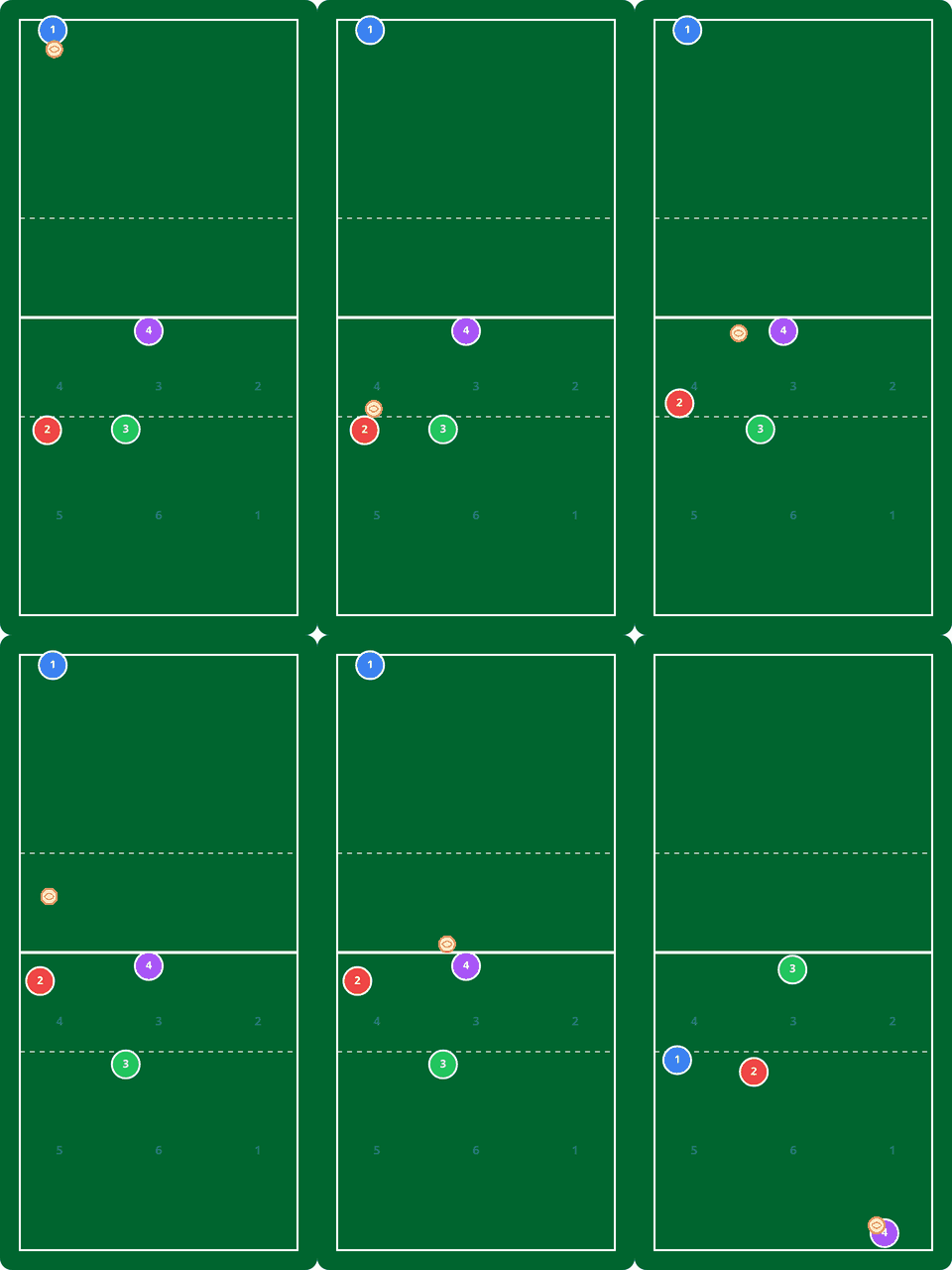
A drill can carry animated court diagrams you build yourself. Place the players, the ball and the equipment on the court, set a keyframe, move them where they go next, set another. Spike plays the movement between them.
This is the butterfly warm-up: the server plays to the passer, the passer to the target at the net, and then everyone follows their own ball one station forward. Four seconds of animation, and you have explained a rotation that takes a paragraph to write and longer to read on a sideline.
A drill can hold several, so the three-player version and the four-player version each get their own — and both are on your phone at the side of the court.
Sessions you build once and keep
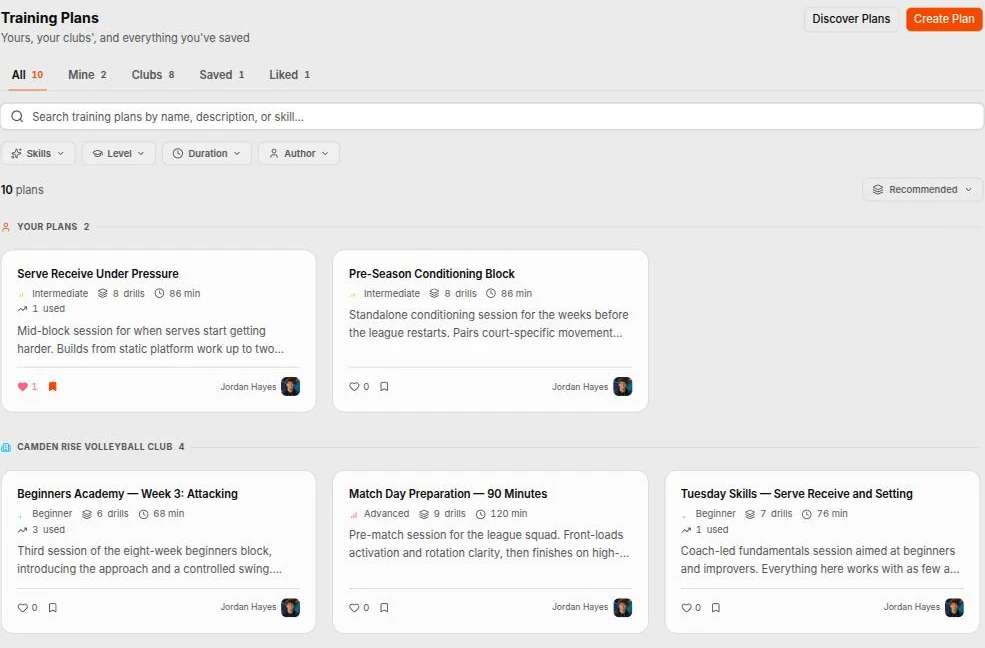
A plan is the shape of a whole session rather than a list of drills: named sections, drills sequenced inside them, a duration and a coaching note on each one. Plans made under a club sit in that club’s library for the other coaches, and each one shows how many times it has been used.
Built against the clock you actually have
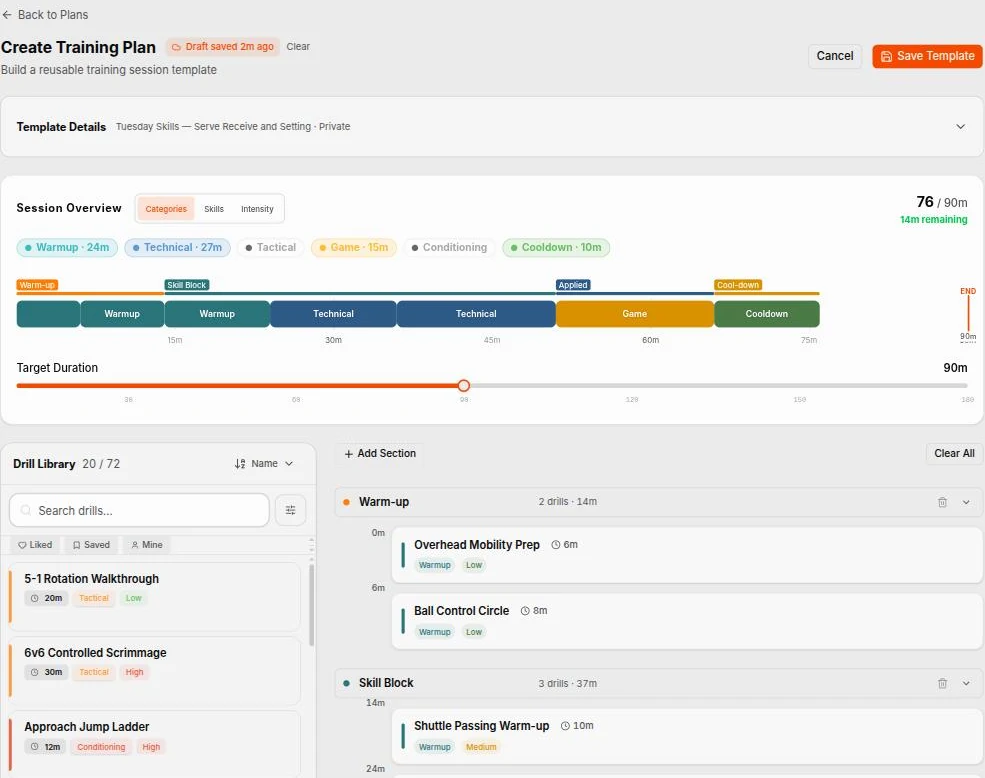
Set the target duration for the session and the builder counts against it as you drag drills in — seventy-six of ninety minutes, fourteen remaining. You find out that the plan does not fit while you are still planning, rather than at half past eight with two drills left and the caretaker waiting. The library sits beside the plan the whole time, searchable, filtered to what you have saved or written.
The whole session at a glance
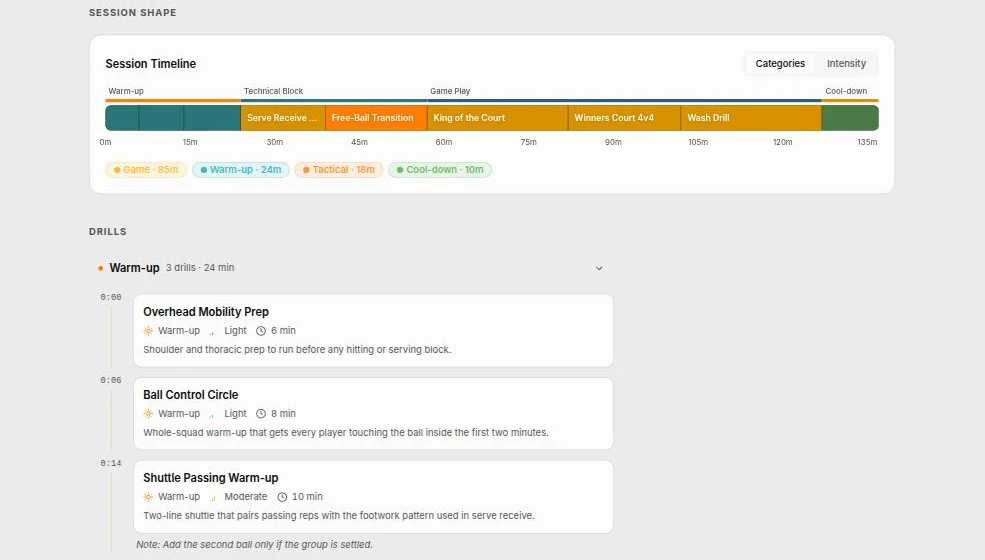
A finished plan draws its own timeline: every block in order, the time each one starts, and the totals per category, so you can see the session is eighty-five minutes of game play and twenty-four of warm-up before you run it. Underneath, each section lists its drills with a running clock and whatever note you left yourself.
Attached to the session players already see
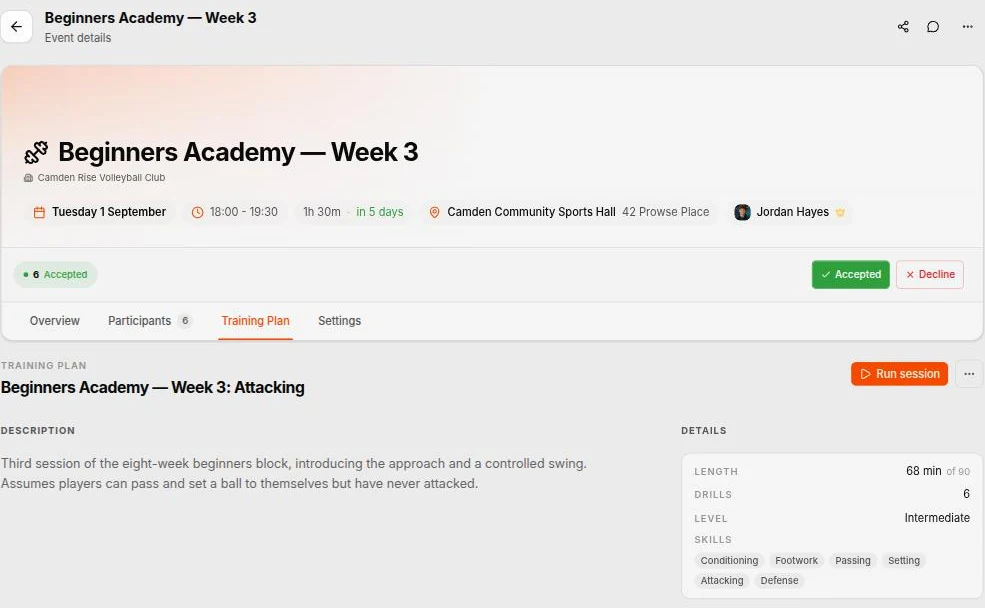
Attach a plan to a training event and it travels with it. Players see what practice holds before they turn up, instead of standing around waiting to be told. The event keeps its own copy, so editing next week’s plan does not rewrite the record of last week’s session.
Run it on the night
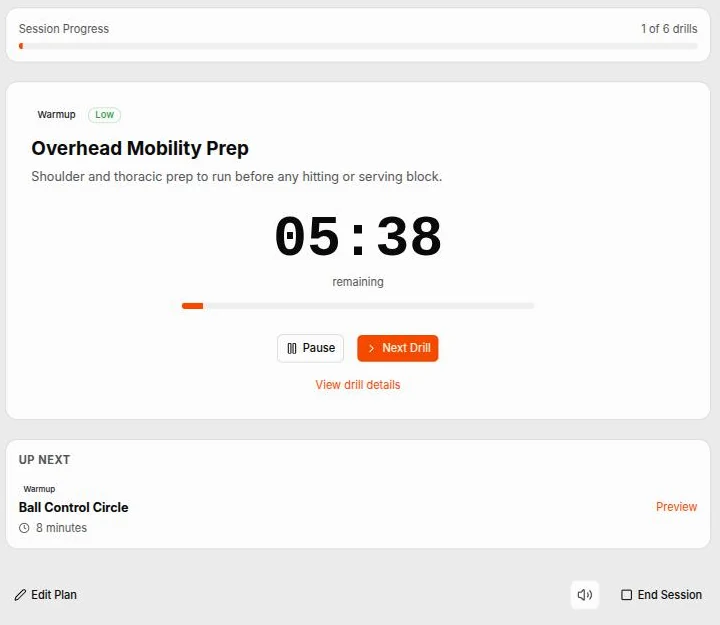
Start the session and Spike counts the drill down for you, shows what is up next, and tracks how far through the session you are. Advance when a block is done, pause when something overruns, and end with a record of what you actually ran rather than what you meant to. It is built to be held in one hand with a ball in the other.
Who it’s for
Coaches planning on a Sunday night
The session you ran in October is still there, still timed, ready to run again or adapt for a different squad.
Clubs with more than one coach
Plans and drills made under the club sit in the club's library, so the second coach starts from your session rather than a blank page.
Volunteers coaching for the first time
A public library of drills with instructions, coaching points and animations, so a willing parent has somewhere to start.
Common questions
What is in the drills library?
Your own drills, your clubs', everything you have saved or liked, and a public library other coaches have published — all in one list, grouped by where each one came from. Filter by phase of the session (warm-up, technical, tactical, game, conditioning, cool-down), by skill (serving, passing, setting, attacking, blocking, defence, footwork, eyework/reading, conditioning), by intensity, by how many players you have, and by how long you have got.
What does a drill actually carry?
Instructions and coaching points as proper rich text rather than one notes field, the category and intensity, how long it runs, the minimum and maximum players, the equipment it needs, and images, video or documents attached to it. It can also carry animated court diagrams. Other coaches can comment on it.
What are the animated court diagrams?
A drill can carry animations you build yourself on a court: place the players, the ball and the equipment, set a keyframe, move them, set another. Spike plays the movement between them. It explains a rotation in about four seconds, which is faster than any paragraph, and it works held up on a phone at the side of the court. A drill can carry several — one for the three-player version, one for four.
Can I add my own drills, and who sees them?
Yes, and most coaches do. A drill is either private to you or public to every coach on Spike, and a drill you create under one of your clubs sits in that club's library for the other coaches there.
How is a training plan different from a drill?
A plan is the shape of a whole session: named sections, drills sequenced inside them, a duration and a coaching note on each one, and a running clock so you can see what time each block starts. Build it once and reuse it — Tuesday's setter session does not need reinventing every week.
How do I know the session fits the hall time?
Set a target duration and the builder counts against it as you add drills — 76 of 90 minutes, 14 remaining — so you find out at the planning stage rather than at half past eight with two drills left. The finished plan also draws its own timeline, with the time each block starts and totals per category.
Can players see the plan?
Attach a plan to a training event and it travels with the session, so players can see what practice holds before they arrive rather than standing on the sideline waiting to be told.
Can I run the plan during the session?
Yes. Start the session and Spike counts each drill down for you, shows what is up next, and tracks where you are through the session. Advance when a block is done, pause when something overruns, and end the session with a record of what you actually ran rather than what you meant to.
Can our coaches share plans with each other?
Yes. A plan created under the club sits in the club's library for every coach there, and any coach can like it, save it, or start a new plan in the builder from one that already exists — so a second coach adapts your session rather than starting from a blank page. Each plan shows how many times it has been used.
The rest of the club, too
Plan Tuesday properly, once
Pull drills from the library, time the blocks against the hall you have, and attach the plan to the session. Next week it is already there.
Build a session plan